Ping
|
The |
Choosing Ping under a core name issues a ping request to check whether the core is up and responding to requests.
The search executed by a Ping is configured with the Request Parameters API.
See Implicit Request Handlers for the paramset to use for the /admin/ping endpoint.
Configuring Ping
PingRequestHandler delegates to a configured query, set via qt/q invariants, and responds OK if that query succeeds, or with the delegated handler’s error if it doesn’t:
<requestHandler name="/admin/ping" class="solr.PingRequestHandler">
  <lst name="invariants">
    <str name="qt">/search</str> <!-- handler to delegate to -->
    <str name="q">some test query</str>
  </lst>
</requestHandler>
You can also configure a healthcheckFile to enable or disable the handler independent of whether Solr itself is healthy - useful for pulling a node out of load balancer rotation for maintenance:
<requestHandler name="/admin/ping" class="solr.PingRequestHandler">
  <!-- relative paths are resolved against the data dir -->
  <str name="healthcheckFile">server-enabled.txt</str>
  <lst name="invariants">
    <str name="qt">/search</str>
  </lst>
</requestHandler>
With healthcheckFile configured, an action request parameter controls it:
-
action=enable- creates the health check file if it doesn’t already exist -
action=disable- deletes the health check file if it exists -
action=status- reportsenabled,disabled, ornot_configured
If the file is configured but missing, Ping returns an HTTP error even if the server is otherwise healthy.
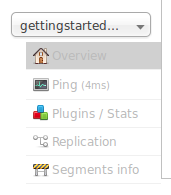
The Ping option doesn’t open a page, but the status of the request can be seen on the core overview page shown when clicking on a collection name. The length of time the request has taken is displayed next to the Ping option, in milliseconds.
Ping API Examples
While the UI screen makes it easy to see the ping response time, the underlying ping command can be more useful when executed by remote monitoring tools:
Input
http://localhost:8983/solr/<core-name>/admin/pingThis command will ping the core name for a response.
Input
http://localhost:8983/solr/<collection-name>/admin/ping?distrib=true&wt=xmlThis command will ping all replicas of the given collection name for a response:
Sample Output
<response>
   <lst name="responseHeader">
      <int name="status">0</int>
      <int name="QTime">13</int>
      <lst name="params">
         <str name="q">{!lucene}*:*</str>
         <str name="distrib">false</str>
         <str name="df">_text_</str>
         <str name="rows">10</str>
         <str name="echoParams">all</str>
      </lst>
   </lst>
   <str name="status">OK</str>
</response>
Both API calls have the same output. A status=OK indicates that the nodes are responding.
SolrJ Example with SolrPing
SolrPing ping = new SolrPing();
ping.getParams()
    .add("distrib", "true"); // To make it a distributed request against a collection
SolrPingResponse rsp = ping.process(solrClient, collectionName);
String status = (String) rsp.getResponse().get("status");
SolrJ Example with SolrClient
final SolrClient solrClient = getSolrClient();
SolrPingResponse pingResponse = solrClient.ping(collectionName);
String status = (String) pingResponse.getResponse().get("status");